Public
An ordinary Starknet balance, visible on-chain.
TransferAccepted
- From
- 0x07a0…b4d
- To
- 0x04a1…7b2
- Amount
- 120 STRK
Everyone sees the amount and who gets it.
Private balances on Starknet
Outis is a self-custodial Starknet wallet with a private balance built in, so you can pay and be paid without anyone seeing it.
Coming soon
Chrome extension, Android and iPhone. The same wallet opens on each.
Public by default
Outis is Greek for “nobody”. Which is exactly who sees your balance.
Next to your public balance, Outis keeps a private one. Tokens there are encrypted notes in STRK20, Starknet’s privacy pool, and spending them takes a zero-knowledge proof that the wallet builds for you.
An ordinary Starknet balance, visible on-chain.
Everyone sees the amount and who gets it.
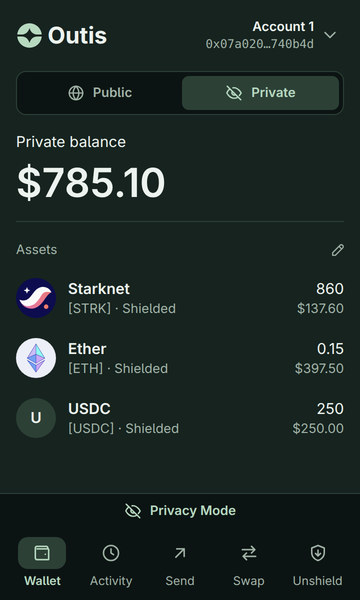
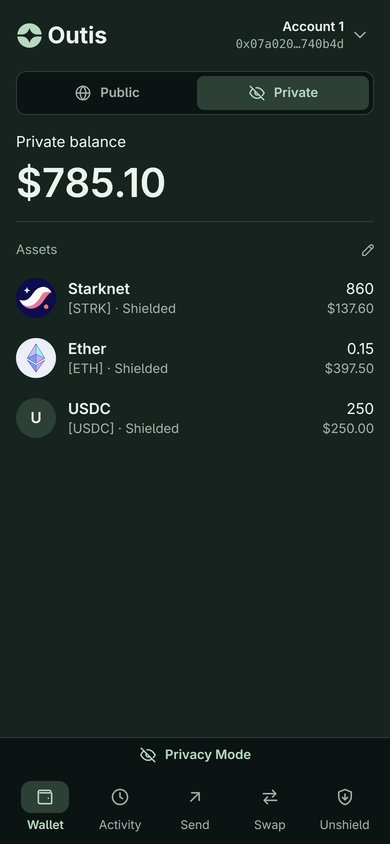
Held in the privacy pool, marked Shielded.
Nobody sees the amount, who gets it, or that it came from you.
Inside the wallet
Everything here is the real wallet: the same screens in the Chrome extension and on your phone.
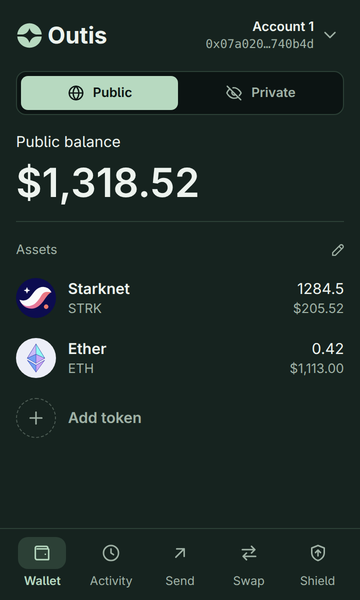
01Two balances
Public is an ordinary Starknet balance, visible on-chain. Private is held in the privacy pool, and every token in it is marked Shielded.
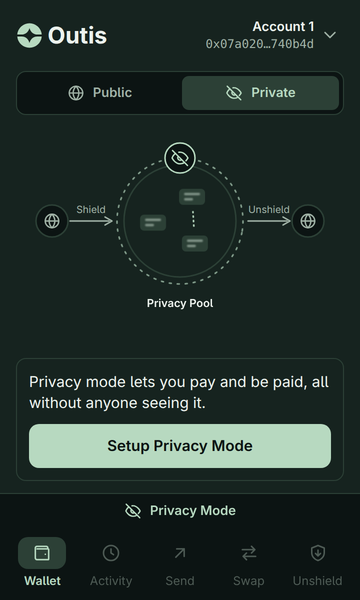
02Set up once
Shield moves tokens from your public balance into the private one. Unshield moves them back out, to any public address.
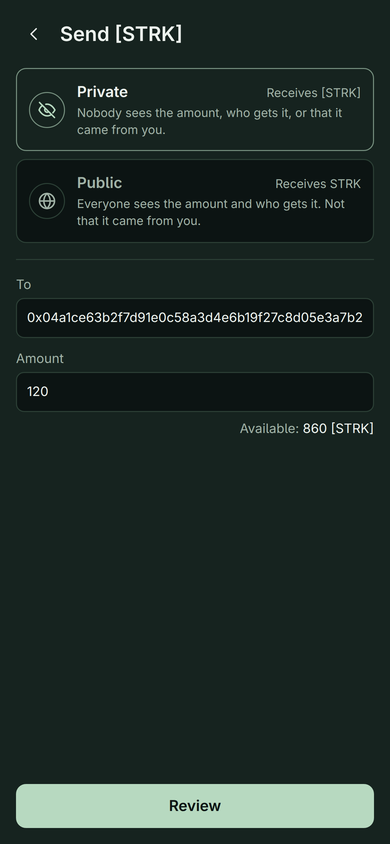
03Pay and get paid
Choose Private and nobody sees the amount, who gets it, or that it came from you. Payments to you can land in your private balance too.
Face ID, fingerprint or your device’s screen lock; the wallet’s signing key is derived from it. Or a password, where a passkey can’t be used.
Through the standard wallet interface. Every request is shown and needs your click, and a dApp sees your private balance only with your permission.
Your keys come from your passkey or recovery phrase, and the signing key never leaves the wallet.
Shadow accounts, to use a dApp from a separate account that isn’t linked to yours. Swaps are coming too.
How it works
Face ID, fingerprint or your screen lock. Write down the recovery phrase, shown once.
One zero-knowledge proof, once, and the private balance is ready.
Move tokens in from your public balance, or have someone pay you privately.
Pick Private and press Review. The wallet builds the proof; you check the fees and confirm.
Get Outis
A Chrome extension, an Android app and an iPhone app. The same wallet opens on each.
Desktop
In your toolbar, or open in the side panel.
Coming soon
Phone
Unlocks with your fingerprint or screen lock.
Coming soon
Phone
Unlocks with Face ID or your passcode.
Coming soon
Security
No signing blind. The facts, plainly.
Keys come from your passkey or your recovery phrase. The signing key and the recovery phrase never leave the wallet.
Every signature is computed from the transaction on your screen, never from a hash a website hands over. Requests that would change who controls the account, or its code, are refused.
The account contract is Argent Account v0.5.0’s audited code (audit by ChainSecurity), renamed for Outis with no logic changes.
We spend hundreds of millions of tokens red-teaming our code and infrastructure with the latest LLMs.
Every request is shown and needs your click. Reading your private balance takes your permission, and that permission expires: an hour by default, a day at most.
Οὖτις is Greek for “nobody”. It is the name Odysseus gave the Cyclops, so that when the Cyclops cried for help, he cried “Nobody is hurting me”.
Your private balance and the payments you make from it. Tokens there are encrypted notes in STRK20, Starknet’s privacy pool. A private payment hides the amount, who gets it, and that it came from you.
Using the pool is itself visible on-chain; what you did inside it is not.
A network fee and a pool fee. The wallet shows both before you confirm.
Use your recovery phrase. It is shown once when you create the wallet, and you confirm it then. It is the way back in.
Only with your permission, and the permission expires: after an hour by default, a day at most. Every request a dApp makes is shown and needs your click.
Go private
Outis for Chrome, Android and iPhone. Set up a private balance once, then pay and be paid without anyone seeing it.
Coming soon